
If your payment page is stuck on "Securing payment information" or keeps loading without proceeding, you are not alone as this can happen intermittently when your browser or the payment gateway has difficulty completing the card authentication step.
The good news is that there is a quick fix that works in most cases: switching to the manual card entry option on the checkout page. This article walks you through exactly how to do it.
If this happens to you, do not cancel your order during the loading period. Cancelling while a payment is processing can trigger a longer manual review and delay your order further.
1. How To Use Manual Card Entry at Checkout
If your payment is stuck loading, follow these steps to switch to manual card entry and complete your purchase:
Step 1: Go back to the G2G checkout page. If the page is still stuck, refresh the page — your cart and order details will still be saved.
Step 2: On the checkout page, look for the card payment section. You will see an option labelled "Enter card manually" or a form with fields for your card number, expiry date, and CVV.
Step 3: Click "Enter card manually" to switch from the auto-fill or saved card method to direct key-in mode.
Step 4: Type your card details directly into the fields:
- Card number (16 digits, no spaces needed)
- Expiry date (MM/YY)
- CVV (3 or 4 digits on the back of your card)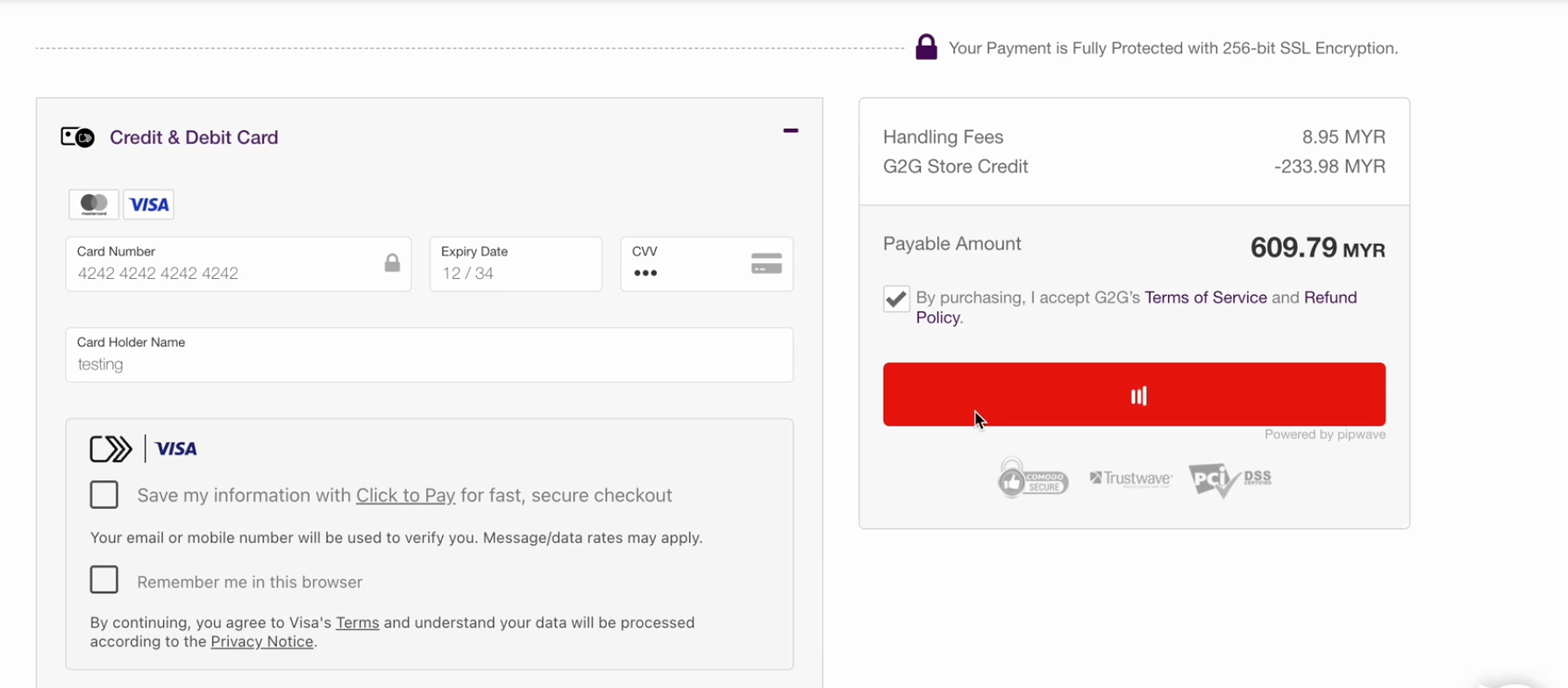
Step 5: When you see the following two checkboxes on the payment page, do NOT tick both of them at the same time:
- "Save my information with Click to Pay for fast, secure checkout"
- "Remember me in this browser"
Step 6: Click Pay or Confirm to submit your payment. The page should process within a normal timeframe (under 30 seconds).
Step 7: Once payment is confirmed, you will be redirected to your order page and your order will move to "Paid" status.
2. If The Page is Still Loading After Entering Your Card Details
If you have entered your card details manually but the page is still loading after 2–3 minutes, try the following:
- Check your internet connection and make sure it is stable.
- Try a different browser (Chrome or Edge are recommended) or switch from mobile to desktop.
- Clear your browser cache and cookies, then retry the checkout from the beginning.
- If you use a VPN, try turning it off before attempting payment. VPNs can sometimes interfere with payment gateway authentication.
- Try a different card if you have one available (Mastercard or Visa from a different issuing bank).
If none of the above resolves the issue, contact G2G Support at support@g2g.com. Include the following in your message so the team can investigate quickly:
- Your G2G username or registered email address
- The order ID (if one was generated)
- A screenshot of what you are seeing on the payment page
- The card type you are using (Visa / Mastercard) and your country
3. FAQ
Q: My payment is stuck loading. Has my card already been charged?
A: Not necessarily. A stuck loading screen usually means the payment has not completed yet — no charge has been confirmed. You can check your bank account or card app to see if a pending transaction has appeared. If you see a pending charge but your order remains unpaid on G2G, contact G2G Support at support@g2g.com — the charge is typically an authorization hold and will be released automatically within 1–14 days if the payment did not go through.
Q: Why did the payment page get stuck in the first place?
A: This can happen when the payment gateway experiences a temporary delay often caused by your bank's authentication system, network conditions, or a brief disruption on the card processor's end. It is not caused by anything wrong with your account. Switching to manual card entry bypasses the automated flow and usually resolves the issue immediately.
Q: I entered my card manually but the page loaded for 2–3 minutes. Is something wrong?
A: A brief delay during manual card entry can happen if your bank is performing an additional verification step (such as 3D Secure). Wait up to 3 minutes before taking action — do not refresh or close the page during this period, as it may interrupt the transaction. If the page is still stuck after 3 minutes, follow the steps in Section 2 above.
Q: Should I cancel my order and try again?
A: No, do not cancel the order while a payment is processing. Cancelling during an active payment attempt can cause a longer review delay. Wait for the loading to either complete or time out on its own, then follow the troubleshooting steps in Section 2 if needed.